Corporate Event App: Replacing the Printed Agenda With One Link

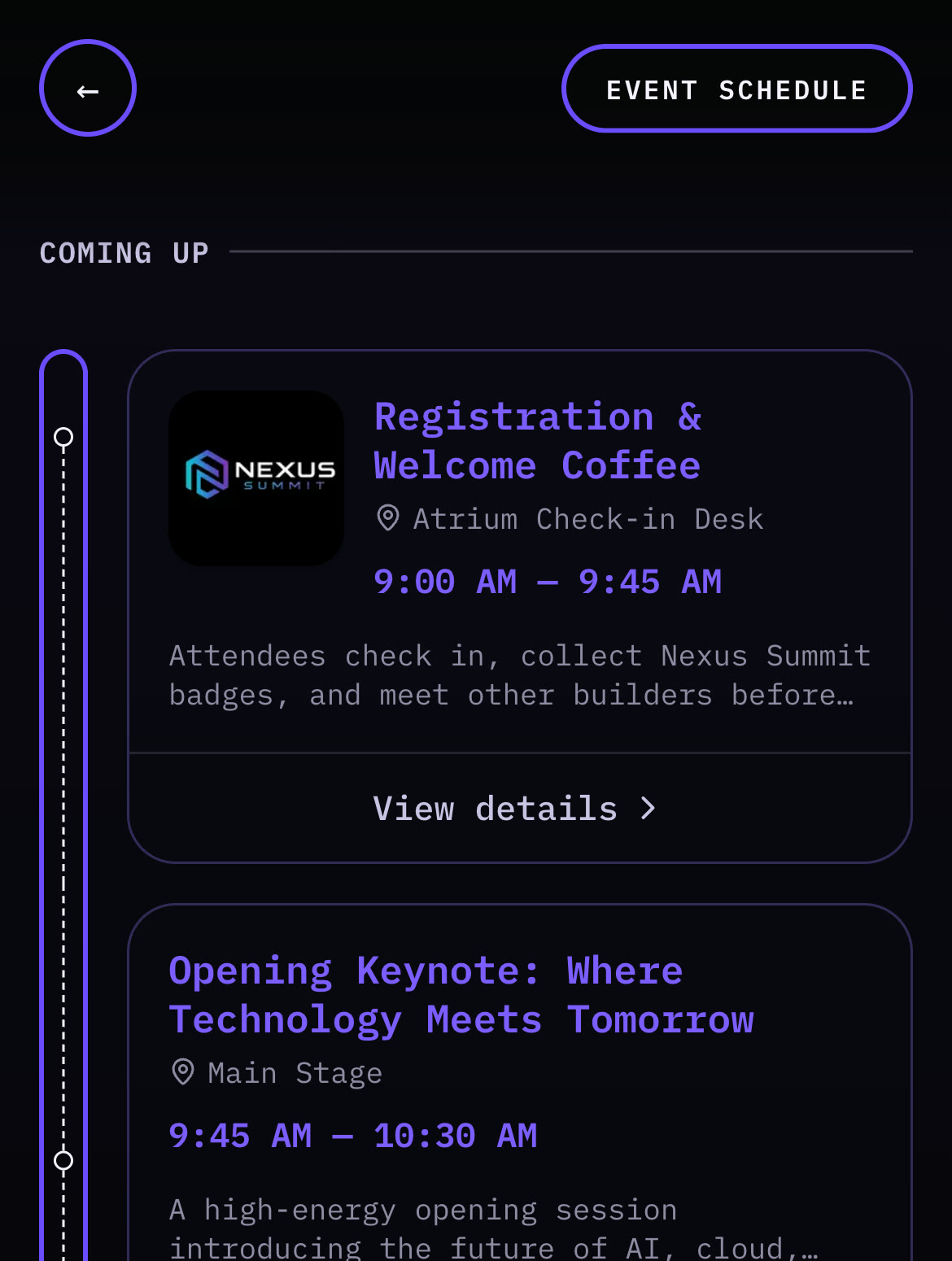
A corporate event app, for most organisers, needs to do one job well: replace a printed agenda with something delegates can check instantly, without installing anything. That’s it. Here’s why most of the tools that show up when you search for one are built for a different problem entirely, what they cost, and what to settle internally before you roll anything out to staff.
Most “corporate event apps” are built for a different problem than yours
Search for a corporate event app and you’ll land on platforms like Whova or Webex Events: attendee matchmaking, sponsor exhibitor booths, live polling, multi-track personalised agendas, custom quote pricing. That’s a genuinely useful feature set, for a large conference with thousands of attendees and a sales team behind the booking.
If you’re organising a company offsite, an awards dinner, or a 50 to 300 person retreat, that entire feature set is overhead you’ll never touch. You don’t need attendee matchmaking for a team of 80 people who already work together. You don’t need sponsor lead capture if there are no sponsors. Evaluating your event against tools built for a different scale of problem just makes the decision harder than it needs to be.
What a smaller corporate event actually needs
Strip away the enterprise feature set and what’s left is short:
| Need | Why it matters |
|---|---|
| A schedule delegates can check without asking | Multi-day events especially, once people stop carrying a printed booklet around |
| A catering or dietary menu | Especially where dietary requirements need to be visible ahead of the meal, not discovered at the table |
| Seating information, if there’s a seated element | Awards dinners, formal sessions, anywhere assigned seating matters |
| One branded link to share instead of a PDF | A single place, not an email attachment nobody reopens after day one |
That’s a genuinely smaller list than what conference-platform marketing pages lead with, and for most company events, it’s the whole list.
What these platforms cost, and why almost nobody publishes a price
This is the hardest thing to research and the thing every organiser needs first, because the pricing model tells you who the tool is built for before you read a single feature.
| Option | Price | What to know |
|---|---|---|
| Whova | No published price at all. The pricing page is a quote request form, scoped by event format, length, expected attendees and events per year | US vendor, quoted in USD, add currency conversion. Third-party guides also report a percentage-plus-fixed registration fee on paid tickets, which is usually irrelevant for an internal event that doesn’t sell any |
| Eventify | Listed from $249 for 400 attendee credits | US vendor, USD, add conversion. Its pricing rose steeply during 2025, so older comparison articles understate it |
| LineUpr | Third-party listings put entry pricing near €119 for a single event with 50 attendees included, rising with headcount | EU vendor (Germany), priced in EUR excluding VAT, add conversion. Its own page is a calculator rather than a fixed list, and states single events cost roughly 20% more per event than the annual plan |
| Printed A5 delegate booklet, 100 copies | £45 to £85 | UK printers, saddle-stitched, 8 pages. Reprint the lot if a session time changes |
| A browser-based event page | Varies, but priced per event rather than per attendee | No per-delegate cost, so headcount changes don’t change the price |
Checked September 2026. The Whova and LineUpr rows are from those vendors’ own pricing pages; the Eventify and LineUpr entry figures come from third-party software listings, because neither publishes a plain price list. UK print prices are typical trade rates for saddle-stitched A5. Foreign vendors are quoted in their own currency deliberately, because converting an advertised price misstates what they charge.
The pattern matters more than any single number. Quote-only pricing is a signal, not an obstacle. A vendor that won’t publish a price is built around a sales conversation, a procurement process and an annual contract, which is a sensible way to sell to an events team running ten conferences a year. If you’re running one offsite in March, you’ll spend two weeks getting a number that turns out to be scoped for someone else’s problem.
The other trap is per-attendee pricing. Headcount at an internal event moves right up to the week before, and a plan with 50 attendees included gets expensive at 180.
No app to install, for anyone
Enterprise event platforms almost universally require an app download before the event, and that’s real friction, more so at a company event than a wedding. A wedding guest installs something on their personal phone. A delegate at a company offsite is often on a work device, and plenty of companies lock those down: no unapproved app installs without IT sign-off, sometimes a multi-day process for a one-off event. Asking sixty colleagues to clear that hurdle, or to use personal phones for a work event, is a bigger ask than it looks like from the organiser’s side.
A browser-based link removes the problem entirely, not just the inconvenience. Delegates scan a QR code or tap a link, and the event page opens in whatever browser they already have, no install permission needed, no IT ticket, no personal-device workaround.
If you’re putting the link behind a QR code on signage or table cards, the mechanics of generating and printing one are the same whatever the event: our QR code setup guide covers sizing, error correction and the static-versus-dynamic decision you can’t undo once things are printed.
What to actually put in the agenda
Most guidance stops at “share the schedule.” The useful detail is in how each session is written, because a delegate reads an agenda entry in about two seconds while walking. (For the planning side of that agenda, when to book, what a UK venue costs per head and when to collect requirements, see the company offsite timeline.)
- Name the room, not the session type. “Breakout B” tells a delegate nothing when they’re standing in a corridor. “Breakout B, Mezzanine, up the stairs past reception” gets them there. Venue room names are frequently not the names on the venue’s own doors, so walk the building or ask for the signage names.
- Put the start time and the room in the title, not the description. Anything in a collapsed description is invisible to someone scanning.
- Mark what’s optional. At an offsite, the difference between “you should be here” and “you can skip this” is the single most-asked question, and almost nobody labels it.
- Build in the gaps you’ll actually need. Ten minutes between sessions in different rooms is not a break, it’s a transit. Publishing an agenda with no transit time means every session after the first one starts late and delegates think the schedule is wrong.
- Say where lunch is. Obvious, routinely missing.
- Give the last session of the day a hard end time. People have trains and childcare, and a vague finish is the thing they’ll ask you about all afternoon.
If there’s a seated dinner or awards element, the name you hold for someone and the name they look themselves up under are often not the same, which is what actually breaks seating lookups on the night. That problem and its fixes are covered in the seating chart guide; it’s written around weddings, but the name-matching failure is identical at a table plan for 200 colleagues.
The data question to settle before you roll anything out to staff
This is the section no vendor page writes and the one that stalls corporate rollouts, because a work event is not a private party. Whoever signs off on tooling at your company will ask some version of these, and it’s faster to have answers than to discover the questions at approval stage.
- What personal data does the tool collect about delegates, and does it need to? Attendee profiles, networking features and in-app messaging all imply storing personal data about your colleagues on a third party’s systems.
- Who is the data controller, and is there a data processing agreement? If the vendor processes your staff’s data, procurement will want the DPA before the event, not after.
- Where is the data hosted? UK and EU organisations routinely need to know whether that’s inside the UK/EEA, and what the transfer mechanism is if it isn’t.
- How long is it retained after the event, and can you delete it? “The event is over” is not the same as “the data is gone.”
- Do delegates have to create accounts? An account means credentials, a record, and a deletion request later.
The practical shortcut: a tool that collects nothing about individual delegates has very little for anyone to review. A schedule, a menu and a seating list are information you are publishing to staff, not data you are collecting about them, and that difference is what turns a three-week approval into a short conversation. This isn’t legal advice, and your own DPO or IT lead has the final say, but knowing which of the two shapes you’re buying tells you which conversation you’re about to have.
Accessibility at a work event is not the same as at a private party
At a company event you have responsibilities to colleagues that simply don’t exist at a private party. In the UK, the Equality Act 2010 places duties on employers around reasonable adjustments, and separately on service providers, so exactly which applies to your event depends on who is in the room: staff only, or clients and members of the public too. Your HR or legal team owns that question, and nothing here is legal advice. What follows is the practical digital side, which is worth getting right regardless of which duty applies:
- A browser page inherits the delegate’s own settings. System font size, browser zoom, screen reader, high-contrast mode and dark mode all carry over, because it’s just a web page. Native apps frequently override some of these, and you have no control over which.
- Don’t put information only in colour. A red dot marking cancelled sessions is invisible to a good proportion of any room of 200 people. Say “cancelled.”
- Check the contrast on your branded theme. Corporate brand palettes are chosen for slide decks, and pale grey body text on white is a common result.
- Keep a human route open. Someone at the registration desk who can answer “where am I meant to be” covers every case a page cannot, including a flat battery. This is worth more than any fallback system designed in advance.
- Print a handful, not hundreds. A few paper schedules at the desk on request costs almost nothing and settles the question of what happens for anyone who wants one.
Quick answers
Do delegates need to download an app? No. The event page opens in a browser from a QR code or link, including on locked-down work devices.
What does a corporate event app cost? Entry pricing from smaller vendors starts near €119 per event in the EU and $249 in the US (USD, add conversion); the large platforms quote per event instead of publishing a price.
Why won’t Whova or Webex show me a price? They scope each quote to attendee count and contract length, which suits an events team running many events a year rather than one offsite.
Is this suitable for multi-day conferences? Yes. A multi-day schedule works the same way as a single-day agenda, with more sessions listed.
Can we brand the event page with our company logo and colours? Yes. Check the text contrast once your palette is applied, since brand colours are usually chosen for slide decks rather than body text.
How far in advance should we set this up? A week is plenty, longer if the catering menu or speaker list is still moving.
What size event is this built for? Smaller and mid-size company events and offsites, not thousand-attendee trade shows with sponsor halls. At that scale a dedicated conference platform is the right call.
The checklist
| When | What to do |
|---|---|
| 6-8 weeks before | Decide per-event or per-attendee pricing, and get the data questions answered if your company reviews tooling |
| 3-4 weeks before | Confirm the agenda structure and catering menu |
| 2 weeks before | Get the real room names from the venue, and build in transit time between rooms |
| 1-2 weeks before | Build the event page: schedule, menu, seating if needed |
| Week of | Finalise branding, check text contrast, and double-check every session time and room |
| Day of | Brief registration staff to help anyone open the link, and keep a few printed schedules at the desk |
| After | Keep the link live for a few days in case anyone wants to revisit details |
Get the agenda and menu locked in early, settle the data question before it’s urgent, and the rest is a single link away from every delegate’s pocket.